Monday, 28 June 2021

AL publishing error " Either the parameter @objname is ambiguous or the claimed @objtype (COLUMN) is wrong."

Sometimes if need to remove columns or fields from Table and try to compile and publish the AL extension again we face below error.


Error


 Either the parameter @objname is ambiguous or the claimed @objtype (COLUMN) is wrong.


Why it happens?


The object metadata in Sql sever could be different from that of your object.

sometime SQL does not recognize the columns or sync same time


What is the solution?


Try to put below parameter in launch.json in your AL extension file.


Hope it help and let me know for more details if we can add it here.


Tuesday, 18 May 2021

Using Microsoft Translations in VS AL Code


SHOW MICROSOFT TRANSLATIONS IN VS CODE

his post is especially interesting for the people whose native language is not English. Do you know the feeling? You are looking at the source code of some .al object and you come across a field name that means absolutely nothing to you. It would be helpful for you if you could see the translation of this field name into your native language. Often this is already sufficient. In the old C/SIDE client we had the field “Caption” in the table designer to see the translation.


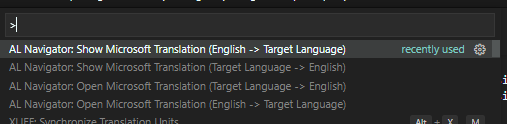
AL Navigator: Open/Show Microsoft Translation


Tuesday, 4 May 2021

Creating a Business Central Incoming document with attachment via BC Webservice.

Creating a Business Central Incoming document with attachment via BC Webservice.

Hey guys...

Today I am trying to create an incoming document in business central with the attached file of an extension like .pdf or .docx file, via publishing one codeunit webservice and consumed by other software or powerautomate.

Below are some steps to be followed

1. Create BC codeunit webservice with custom method in it and publish it

2. Consume this webservice via power automate and generate JSON object text

3. supply JSON object as text in the codeunit method.

4. Process the JSON object and start creating incoming document.


document:text will have a JSON text in the body as a parameter I am here also pasting my JSON objects with the proper format and the result what I am getting after using POST method as per below


Result:

Note: Please make sure header part should have parameter as mentioned below, if you are trying wizdler to use POST method, no need to use this method as wizdler(WSDL) automatically format.

Download Wizdler here for chrome extension.
Download Postman here.


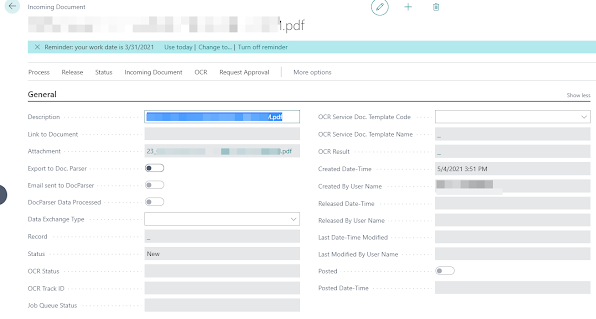
After processing above I am getting my incoming document created as per below screenshot.


Saturday, 27 February 2021

Splits multiple email ids in to (List of Text) data type before sending an email notifications to someone through AL code.


EmailSplits('abc@gmail.com;xyz@gmail.com');

SmtpMail: Codeunit "SMTP Mail";
SmtpConf: Record "SMTP Mail Setup";
EmailBody: text;

SmtpMail.CreateMessage('Checking multiple Emails', SmtpConf."User ID", 
                        Receipt, 'Emails ', EmailBody, true);
        
    local procedure EmailSplits(EmaifieldValue: Text[250])
    var
        PosBgn: Integer;
        ValueLength: integer;
        PosEnd: Integer;
        SplitValue: Text;
    begin
        PosBgn := 1;
        ValueLength := STRLEN(EmaifieldValue);
        REPEAT
            IF STRPOS(EmaifieldValue, ';'0 THEN
                PosEnd := ValueLength
            ELSE
                PosEnd := (STRPOS(EmaifieldValue, ';'1);
            SplitValue := COPYSTR(EmaifieldValue, PosBgn, PosEnd);
            EmaifieldValue := DELSTR(EmaifieldValue, 1, PosEnd + 1);
            Receipt.Add(SplitValue);
        UNTIL EmaifieldValue = '';
    end;


Extension Unpublished/Uninstalled history required in BC Production environment

  There is a situation when someone can uninstall or unpublish any APP extension from the extension management in Production environment, th...