Showing posts with label Wave1. Show all posts

Monday, 1 November 2021

Generate QR code in Business Central using Third party Webservice link

AL Code as per below

Create New Report with having barcode image.


In RDL design add image type control and put the barcod2 variable into that like we do normally for Picture control.


report 50999 QRCodeList
{
    Caption = 'QRCode List Report';
    UsageCategory = Administration;
    ApplicationArea = All;
    DefaultLayout = RDLC;
    RDLCLayout = '.\Report\QRCodeList.rdl';
    dataset
    {
        dataitem("Sales Header"; "Sales Header")
        {
            column(No_; "No.")
            {

            }
            column(temp; barcode2)
            {

            }
            trigger OnAfterGetRecord()
            begin                
                barcode2 := InitArguments("No.");
            end;
        }
    }


Global Variable

  var
        BarCode2: text;


local procedure InitArguments(ItemNo: text): text
    var
        BaseURL: Text;
        Base64Convert: Codeunit "Base64 Convert";
        TempBlob: Codeunit "Temp Blob";
        TypeHelper: Codeunit "Type Helper";
        client: HttpClient;
        response: HttpResponseMessage;
        InStr: InStream;

    begin
        client.get('https://barcode.tec-it.com/barcode.ashx?data=' + itemno + '&code=QRCode', response);
        TempBlob.CreateInStream(InStr);
        response.Content().ReadAs(InStr);
        BarCode2 := Base64Convert.ToBase64(InStr);
        exit(BarCode2);
    end;


Run the report in BC and see the output, it will give you a QR Code as image.


Monday, 12 July 2021

Create vCard QR Codes using Azure Functions

Create vCard QR Codes using Azure Functions

 QR Code Generation in BC with Azure functions


Source : https://carlos.mendible.com/2016/08/28/create-vcard-qr-codes-using-azure-functions/


1. Create a Function App


Head to portal.azure.com and hit the New button. Search for Function App and create one. You’ll be asked for an app name, resource group, app service plan and storage account where the code will live.

2. Create the function


Create a new Function, selecting the empty C# template and give it a name: (i.e QRCoder)

3. Add the code


Replace the contents of the Code (run.csx) section with the following code and save it:

Tuesday, 18 May 2021

Using Microsoft Translations in VS AL Code


SHOW MICROSOFT TRANSLATIONS IN VS CODE

his post is especially interesting for the people whose native language is not English. Do you know the feeling? You are looking at the source code of some .al object and you come across a field name that means absolutely nothing to you. It would be helpful for you if you could see the translation of this field name into your native language. Often this is already sufficient. In the old C/SIDE client we had the field “Caption” in the table designer to see the translation.


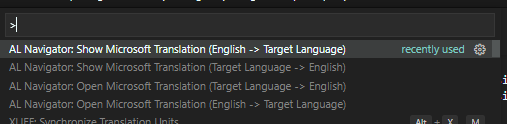
AL Navigator: Open/Show Microsoft Translation


Tuesday, 4 May 2021

Creating a Business Central Incoming document with attachment via BC Webservice.

Creating a Business Central Incoming document with attachment via BC Webservice.

Hey guys...

Today I am trying to create an incoming document in business central with the attached file of an extension like .pdf or .docx file, via publishing one codeunit webservice and consumed by other software or powerautomate.

Below are some steps to be followed

1. Create BC codeunit webservice with custom method in it and publish it

2. Consume this webservice via power automate and generate JSON object text

3. supply JSON object as text in the codeunit method.

4. Process the JSON object and start creating incoming document.


document:text will have a JSON text in the body as a parameter I am here also pasting my JSON objects with the proper format and the result what I am getting after using POST method as per below


Result:

Note: Please make sure header part should have parameter as mentioned below, if you are trying wizdler to use POST method, no need to use this method as wizdler(WSDL) automatically format.

Download Wizdler here for chrome extension.
Download Postman here.


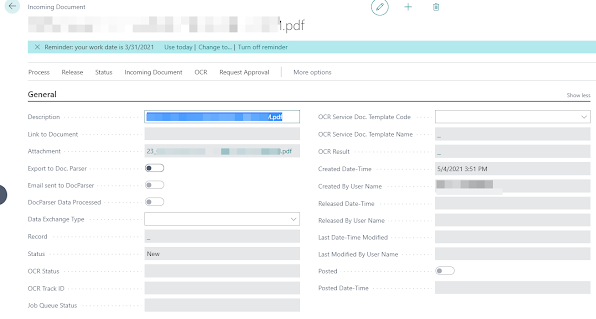
After processing above I am getting my incoming document created as per below screenshot.


Extension Unpublished/Uninstalled history required in BC Production environment

  There is a situation when someone can uninstall or unpublish any APP extension from the extension management in Production environment, th...